
Businesses depend on computers, servers, networks, software, and connected devices to keep their daily operations running. However, maintaining all these systems becomes difficult when employees work from different locations or equipment is spread across multiple offices. A minor technical issue can interrupt important tasks, affect productivity, or create security problems if nobody notices it early. This is where remote monitoring and maintenance becomes useful. It allows IT professionals to observe system performance, identify potential problems, perform routine maintenance, and resolve many technical issues without visiting each location.
For businesses with limited IT resources, managing equipment individually can consume considerable time. Employees may report problems only after a system stops working, while outdated software and unnoticed performance issues can create additional risks. Remote monitoring and maintenance provides a more organized approach by giving technical teams visibility into connected systems through centralized tools. Instead of waiting for something to fail, administrators can review system conditions, investigate unusual activity, and address maintenance needs before they become serious disruptions.
However, choosing and implementing the right approach requires more than installing monitoring software. Businesses must understand which devices need attention, what information should be collected, how remote access should be protected, and which maintenance activities can safely be automated. This guide explains how the process works, where it provides the most value, what challenges to consider, and how to build a reliable system.
What Is Remote Monitoring and Maintenance?
Remote monitoring and maintenance is a technology-based approach that allows IT teams to observe, manage, troubleshoot, and maintain computers, servers, networks, applications, and other connected equipment from a different location. It combines continuous system monitoring with maintenance activities that help keep technology working properly. Depending on the environment, these activities may include checking device health, installing software updates, managing security patches, reviewing system logs, identifying performance problems, and resolving technical issues remotely.
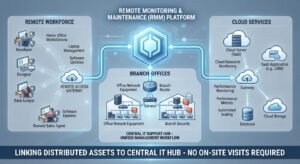
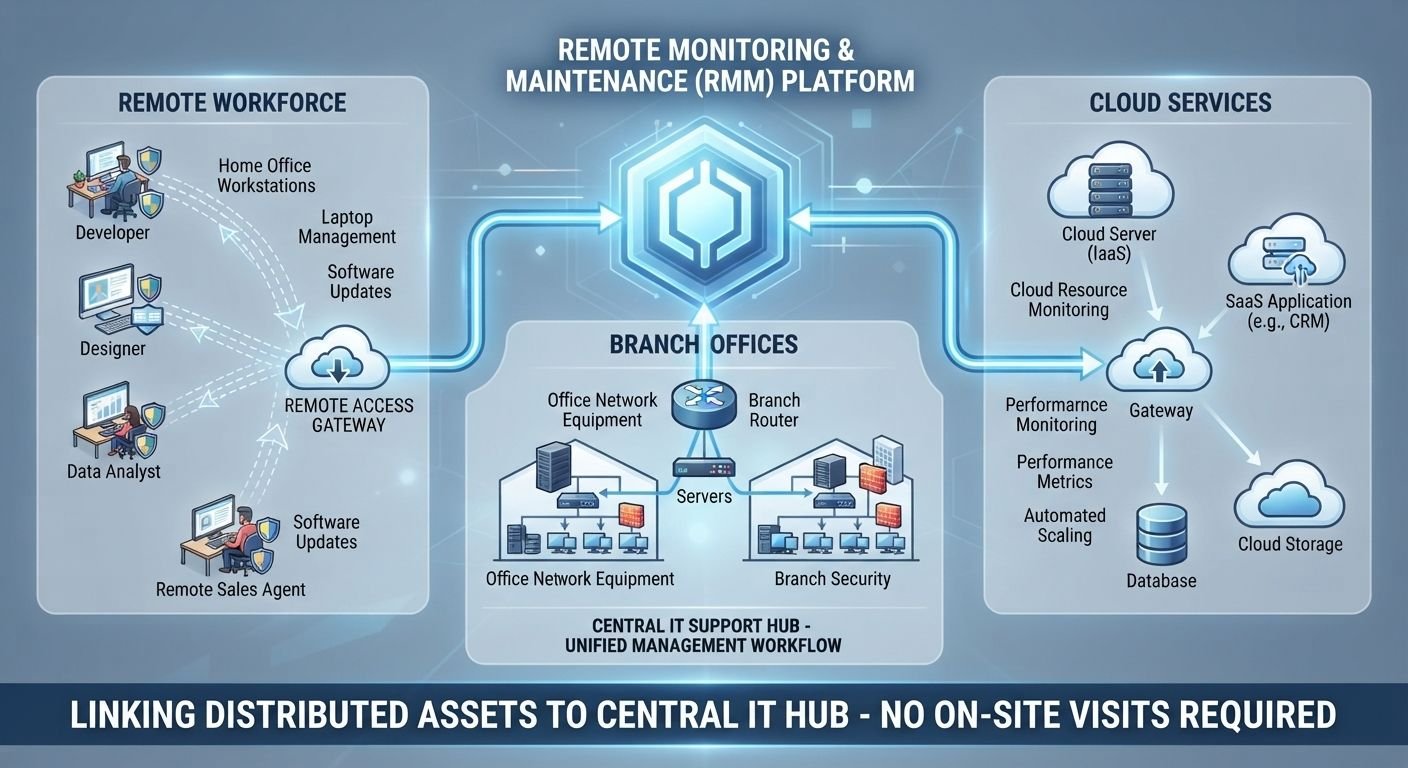
In business IT environments, this approach is commonly associated with remote monitoring and management (RMM) software. RMM platforms give administrators a centralized view of multiple devices instead of requiring them to check every computer or server individually. Some solutions use lightweight software agents installed on managed devices, while others connect to cloud platforms through APIs and integrations. Both approaches help collect system information and make it available through a central management interface.
For example, imagine a company with 40 employees working across three different offices. Each employee depends on a computer, while the company also operates shared servers, printers, network equipment, and business applications. Without centralized monitoring, the IT department may need to visit individual offices or wait for employees to report technical problems. With a suitable remote monitoring and maintenance system, administrators can check device performance, identify computers running low on storage, review update status, and investigate network problems from one location.
It is important to understand that monitoring and maintenance are related but different activities. Monitoring involves collecting and reviewing information about a system’s condition. Maintenance involves taking action to preserve or restore its performance. Monitoring might reveal that a server is approaching its storage limit, while maintenance could involve removing unnecessary files, expanding storage capacity, or adjusting how the server manages data. Combining these activities creates a more proactive IT management process.
How Does Remote Monitoring and Maintenance Work?
The process generally begins by connecting the devices and systems that need supervision to a monitoring platform. In traditional environments, IT administrators install an agent on each managed computer or server. This agent collects information about hardware performance, operating system status, available storage, running processes, network activity, and other relevant conditions.
The collected information is then transmitted to a centralized dashboard. Administrators can use this dashboard to review multiple devices, compare performance, and identify unusual behavior. Some platforms also support agentless monitoring through network protocols, cloud integrations, or application programming interfaces. The appropriate method depends on the equipment, operating environment, and monitoring requirements.
After collecting the information, the software evaluates it against predefined conditions. For example, an administrator might configure an alert when a server’s storage capacity becomes critically low or when a computer stops communicating with the network. If the system detects a condition that requires attention, it can notify the responsible IT employee through an email, dashboard notification, or another supported alert channel.
The administrator then investigates the issue and decides whether remote maintenance is appropriate. This may involve restarting a service, installing an approved update, adjusting a configuration, removing unnecessary files, or accessing the affected device remotely. Certain repetitive tasks can also be automated, provided they have been tested and approved.
The process does not end when an issue is resolved. A reliable system should record what happened, what action was taken, and whether the device returned to normal operation. These records help administrators identify recurring problems and understand whether existing maintenance procedures are working.
Why Businesses Need Remote Monitoring and Maintenance
One of the main reasons businesses adopt remote monitoring and maintenance is that modern IT environments are no longer limited to a single office. Employees may work from home, servers may operate in cloud environments, and different branches may depend on separate network connections. Managing these systems through occasional physical inspections is not always practical.
Another issue is the expense of fixing problems after they occur. When a business waits until a computer, server, or network device stops working, the resulting disruption can affect employees and customers. A relatively small issue, such as an almost full hard drive, may eventually prevent an important application from operating correctly. Regular monitoring helps administrators identify these conditions earlier.
Security is another important consideration. Devices that do not receive necessary updates may remain exposed to known vulnerabilities. Remote monitoring platforms can help IT teams identify missing patches, review security-related events, and coordinate maintenance across multiple devices. However, monitoring software should support a broader cybersecurity strategy rather than replace dedicated security controls.
Businesses also need a consistent way to understand the condition of their technology. Without centralized information, different employees may maintain devices using different procedures. This can create inconsistent configurations, missed updates, and incomplete maintenance records. A structured remote management process helps establish clearer responsibilities and more consistent operating practices.
Key Benefits of Remote Monitoring and Maintenance
1. Early Detection of Technical Problems
One of the most valuable benefits is the ability to identify unusual system behavior before it causes a major interruption. Monitoring tools can track resource usage, hardware conditions, network availability, and application performance. When a device begins behaving differently from its normal operating pattern, administrators can investigate the change.
For example, if a business server regularly uses a large amount of memory, administrators may need to determine whether the workload has increased or a particular application is consuming more resources than expected. Without monitoring, the issue might remain unnoticed until employees experience slow performance or service interruptions.
2. Reduced Maintenance Delays
Remote maintenance allows authorized technicians to address many software and configuration problems without traveling to the affected location. This is particularly helpful for companies with multiple offices or employees working outside traditional workplaces.
Suppose an employee cannot access a business application because a related service has stopped running. If the device is connected and the problem can be safely resolved remotely, an administrator may be able to restart the service and verify its operation without scheduling an on-site visit.
However, not every issue can be fixed remotely. Damaged hardware, disconnected power supplies, physical cable problems, and certain network failures may still require someone at the location.
3. Better Software and Security Update Management
Keeping operating systems and applications updated is an essential part of technology maintenance. Remote monitoring and maintenance tools can help administrators identify outdated software, organize update schedules, and deploy approved patches across managed devices.
This is especially useful when a business operates dozens or hundreds of computers. Updating every device manually can create unnecessary administrative work and increase the chance that some machines will be overlooked.
A good update process should include testing, deployment planning, verification, and a recovery option. Businesses should also prioritize updates based on security risk and operational importance rather than treating every update as equally urgent, following established patch management practices that treat patching as an ongoing preventive maintenance process.
NIST Computer Security Resource Center+1
4. More Consistent System Performance
Computers and servers can gradually become less efficient because of storage limitations, outdated applications, unnecessary background processes, or changing workloads. Regular monitoring gives IT teams a clearer understanding of these conditions.
For instance, administrators may discover that several office computers have very little available storage. They can investigate whether temporary files, outdated applications, or unnecessary data are contributing to the problem. Addressing the cause can help restore available space and reduce performance-related complaints.
The benefit comes from understanding system behavior over time, not simply reacting to individual alerts.
5. Improved Management of Distributed Devices
Companies with remote employees, branch offices, or geographically separated equipment need a practical way to manage their technology. Remote monitoring and maintenance provides centralized visibility into supported devices, even when those devices are not physically located near the IT department.
This can help businesses maintain more consistent configurations, review device availability, and identify systems that need attention. It is particularly useful for managed service providers (MSPs) responsible for maintaining IT environments belonging to multiple customers.
6. More Efficient Use of IT Resources
IT employees often spend considerable time handling repetitive maintenance activities. Checking device status, reviewing update reports, identifying low-storage computers, and performing routine configuration tasks can take attention away from more complicated technical work.
Automation can reduce some of this workload. For example, a platform may generate regular device health reports or notify administrators when a particular maintenance condition occurs. Approved scripts can also perform repetitive tasks across multiple devices.
This does not mean every maintenance activity should be automated. Tasks involving sensitive data, important business applications, or significant configuration changes should receive appropriate human review.
7. Better Maintenance Records and Accountability
A centralized monitoring system can provide useful records of device conditions, alerts, maintenance activities, and administrative actions. These records make it easier to understand what happened when a problem occurred.
For example, if a business application begins experiencing errors after a software update, administrators can review maintenance records to determine whether the timing of the update is relevant. This information can help narrow down the possible cause and support a more organized troubleshooting process.
Maintenance records are also useful when businesses need to review internal procedures, demonstrate that maintenance activities were authorized, or investigate repeated technical problems.
Which Systems Can Be Managed Remotely?
Remote monitoring and maintenance is not limited to desktop computers. Its capabilities depend on the monitoring platform, available connections, device compatibility, and the level of access provided.
Computers and laptops are among the most common devices managed through RMM platforms. Administrators can monitor operating system health, available storage, software versions, security updates, and other performance indicators. This is useful for businesses with employees working from different locations.
Servers also benefit from continuous monitoring because they often support important business applications, databases, file storage, and internal services. Administrators may monitor processor usage, memory consumption, storage capacity, service availability, and network activity to identify potential performance problems.
Network equipment, including supported routers, switches, firewalls, and wireless access points, can also be monitored remotely. This helps administrators investigate connectivity problems, review device status, and identify unusual network conditions.
Cloud infrastructure requires a slightly different approach. Rather than relying exclusively on installed agents, administrators may use cloud monitoring services, APIs, and platform integrations to collect information about virtual machines, storage resources, applications, and other cloud services.
Some businesses also use remote monitoring for Internet of Things (IoT) devices and industrial equipment. Connected sensors may report temperature, vibration, operating conditions, or other equipment information. These readings can help maintenance teams identify changes that deserve investigation. However, industrial operational technology requires additional safety and security controls, particularly when remote access could affect physical processes.
How to Choose the Right Remote Monitoring and Maintenance Solution
Selecting a suitable platform starts with understanding the environment that needs to be managed. A small company with 15 computers may have very different requirements from an MSP responsible for several hundred customer devices. Choosing software based only on the number of advertised features can lead to unnecessary complexity.
The first consideration should be device compatibility. Check whether the platform supports the operating systems, servers, network equipment, and cloud services used by your organization. Also determine whether it requires installed agents, supports agentless monitoring, or offers a combination of both approaches.
The next consideration is monitoring coverage. A useful solution should allow administrators to track the conditions that actually matter to the business. For one organization, disk space and patch status may be the main priorities. Another may need detailed network monitoring, application availability, and server performance information.
Automation capabilities deserve careful evaluation. Look for tools that can schedule routine maintenance, generate reports, manage approved updates, and perform repetitive tasks. However, make sure administrators can control which actions run automatically and which require approval.
Security should be a central part of the decision. Because remote management software can receive powerful permissions, unauthorized access could expose multiple connected systems. Check whether the platform supports multifactor authentication, role-based access control, encrypted communications, activity logging, and appropriate account management.
Integration is another practical factor. Your monitoring platform may need to work with existing ticketing systems, endpoint security software, backup services, identity management tools, or IT service management platforms. Good integration can reduce duplicated work and make technical information easier to use.
Finally, evaluate reporting, vendor support, scalability, and total operating cost. Consider licensing, implementation, training, storage, integrations, and the time needed to maintain the platform. The right solution is the one that fits your actual operational requirements without creating unnecessary administrative work.
How to Implement Remote Monitoring and Maintenance Successfully
Understand Your Existing IT Environment
Before installing monitoring software, identify the devices, applications, servers, and network components that need supervision. Create an inventory containing important information such as device ownership, operating systems, locations, business functions, and maintenance requirements.
This step helps prevent a common implementation problem: installing monitoring agents on some devices while leaving other important systems outside the management process.
Decide What Needs to Be Monitored
Every system has different maintenance needs. A business-critical server may need continuous availability monitoring, while an ordinary office computer may only require regular checks for updates, storage, and security status.
Choose monitoring indicators based on the role and importance of each device. These may include CPU utilization, memory consumption, disk capacity, network availability, application response, patch status, and hardware health.
Configure Useful Alerts
Poorly configured alerts can make remote monitoring and maintenance difficult to manage. If administrators receive notifications for every minor change, important warnings may become lost among less relevant messages.
Set thresholds according to actual operating requirements. For example, a temporary increase in processor usage may be normal during a scheduled backup, whereas sustained high usage during ordinary business hours may deserve investigation.
Alerts should also identify the affected device, explain the condition, and provide enough information for an administrator to decide what to do next.
Establish Maintenance Schedules
Create a maintenance schedule that covers software updates, security patches, system checks, backups, and other recurring activities. Consider business operating hours before scheduling changes that could interrupt employees or customers.
For example, a company may schedule routine updates outside its busiest working hours. Critical security updates may require faster action, but administrators should still consider compatibility, testing, and recovery procedures.
Test Remote Actions Before Wider Deployment
Before using automation across an entire organization, test it on a small group of devices. Confirm that scripts execute correctly, updates install successfully, and remote access works as expected.
A script that works on one operating system may behave differently on another. Similarly, an update that is suitable for ordinary office computers may cause compatibility problems with specialized business software.
Testing helps identify these differences before they affect a larger environment.
Review Results and Improve the Process
After implementation, regularly evaluate alerts, maintenance records, unresolved issues, and device performance. Look for recurring problems rather than treating every incident as an isolated event.
If several devices repeatedly experience the same issue, investigate whether the underlying cause is related to software configuration, network conditions, hardware limitations, or maintenance procedures. This review helps turn monitoring information into useful operational improvements.
Security Risks and Mistakes to Avoid
Remote monitoring and maintenance can improve IT operations, but the same remote access capabilities can introduce security risks when they are poorly controlled. An attacker who gains access to an administrative account or management platform may be able to interact with multiple connected devices.
The first mistake is allowing too many people to have administrative privileges. Every user should receive only the access needed for their responsibilities. Role-based permissions, separate administrator accounts, and multifactor authentication help reduce the risk of unauthorized activity.
Another mistake is leaving remote access tools available without proper supervision. Administrators should review access logs, investigate unexpected connections, and remove unused accounts. Remote management software should also be kept updated and monitored like other important business applications.
Businesses should avoid using shared administrator passwords across multiple systems. If one password is exposed, attackers may gain access to several devices. Strong authentication and controlled account management provide a better approach.
Uncontrolled automation is another concern. Automatically restarting services, deleting files, or installing updates without proper testing can create operational problems. Maintenance actions should have defined permissions, approval requirements, and recovery procedures.
Organizations should also avoid assuming that monitoring software replaces antivirus protection, endpoint detection and response (EDR), firewalls, backups, or dedicated security monitoring. These tools serve different purposes and should work together as part of a broader security strategy.
Government cybersecurity agencies have specifically warned that legitimate remote access and RMM software can be abused by malicious actors. Their guidance emphasizes access restrictions, multifactor authentication, network segmentation, application controls, and reviewing remote access activity.
When Remote Maintenance Is Not Enough
Although remote tools can resolve many software and configuration issues, they cannot eliminate the need for physical technical support. Understanding this limitation helps businesses avoid wasting time attempting to fix problems remotely when an on-site inspection is necessary.
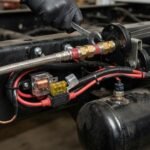
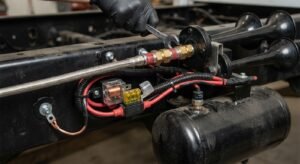
A computer with a damaged power supply, broken display, faulty storage device, or disconnected internal component may require physical repair. Similarly, a network outage caused by damaged cables or electrical problems cannot always be resolved through remote administration.
Some problems also involve systems that are offline or unable to communicate with the management platform. In these situations, the administrator may have no practical way to access the device through ordinary software-based remote management.
Industrial environments require additional caution. Remote changes to operational technology can affect machinery, production processes, or safety-related equipment. Maintenance teams should follow approved procedures and coordinate with responsible personnel before making changes.
The best approach is to combine remote monitoring with a clear escalation process. IT teams should know which problems can be resolved remotely, which require specialist support, and which need someone physically present.
Best Practices for Long-Term Remote System Maintenance
Successful remote monitoring and maintenance depends on consistent procedures rather than the software alone. Businesses should regularly review their device inventory to ensure that newly purchased equipment, retired computers, and relocated devices are correctly reflected in the management platform.
Monitoring thresholds should also be reviewed as business requirements change. A server that previously handled a small workload may need different performance limits after the organization introduces new applications or increases its data processing needs.
Keep remote management agents, administrative consoles, and connected services updated. Review user permissions periodically and remove access that is no longer required. These measures help reduce unnecessary exposure and keep the management environment under control.
Backups and recovery procedures should be tested rather than simply assumed to be working. Remote maintenance can help administrators monitor backup activity, but a successful backup report does not necessarily prove that data can be restored correctly. Periodic recovery testing provides stronger assurance.
Documentation is equally important. Record important configuration changes, maintenance schedules, recurring issues, and recovery procedures. This gives IT employees a reliable reference when investigating problems or handing responsibilities to another team.
Finally, evaluate the results using meaningful operational indicators. Device availability, recurring incident frequency, patch compliance, time taken to resolve problems, and maintenance completion records can help determine whether the current approach is meeting business needs.
The Future of Remote Monitoring and Maintenance
Remote monitoring and maintenance continues to develop as businesses adopt cloud services, connected devices, distributed workplaces, and more automated IT operations. Traditional monitoring focused heavily on individual computers and servers. Modern platforms increasingly connect information from endpoints, cloud environments, network infrastructure, and other technology services.
Artificial intelligence and machine learning are also becoming more relevant to monitoring workflows. These technologies can help analyze large amounts of operational information, identify unusual patterns, and support troubleshooting. However, automated recommendations should still be reviewed when they involve important systems, sensitive information, or potentially disruptive changes.
Another important development is the growing emphasis on security-first remote administration. Businesses increasingly need to consider identity verification, device trust, restricted permissions, and detailed activity records before allowing remote access. The management platform itself must be treated as a critical security asset.
For organizations planning future investments, flexibility will be important. A solution should support current requirements while allowing the business to add new devices, cloud services, and monitoring capabilities without rebuilding its entire management process.
Conclusion
Remote monitoring and maintenance gives businesses a practical way to manage technology without depending entirely on physical inspections or reactive technical support. By combining continuous monitoring, remote troubleshooting, scheduled updates, and controlled automation, organizations can maintain better visibility into their IT environments and respond to problems more efficiently.
However, the real value depends on how the system is implemented. Businesses need to identify their most important devices, select suitable monitoring tools, configure meaningful alerts, and establish clear maintenance procedures. Security must remain a priority because remote management platforms can provide access to multiple connected systems.
For organizations managing distributed employees, multiple offices, servers, or connected equipment, remote monitoring and maintenance can become an important part of everyday IT operations. The most effective approach combines reliable technology, trained administrators, documented procedures, and regular performance reviews. Rather than expecting software to solve every technical problem automatically, businesses should use it to make better decisions, reduce avoidable interruptions, and maintain dependable systems over time.
Frequently Asked Questions
1. What is the main purpose of remote monitoring and maintenance?
The main purpose is to monitor connected systems, identify potential problems, and perform maintenance without requiring technicians to visit every location. It helps businesses maintain computers, servers, networks, and supported devices through centralized management tools. It also makes routine activities such as software updates, performance checks, and troubleshooting easier to coordinate.
2. Is remote monitoring and maintenance suitable for small businesses?
Yes. Small businesses can benefit because they often have limited IT staff and cannot afford to spend excessive time checking individual computers. A suitable monitoring platform can help identify outdated software, low storage, device availability problems, and other technical issues. However, the solution should match the company’s size and actual requirements rather than include unnecessary enterprise-level features.
3. What is the difference between remote monitoring and remote maintenance?
Remote monitoring involves collecting and reviewing information about a device or system to understand its condition. Remote maintenance involves performing actions to maintain or restore that system. For example, monitoring may identify that a computer has outdated software, while maintenance involves installing the required update and checking whether it was installed successfully.
4. Does remote monitoring require software installation on every device?
Not always. Traditional RMM platforms commonly use software agents installed on managed devices to collect information and support remote administration. However, some modern solutions use agentless monitoring, network protocols, APIs, and cloud integrations. The required approach depends on the platform, device type, operating system, and monitoring capabilities.
5. Is remote monitoring and maintenance secure?
It can be secure when implemented with appropriate safeguards. Businesses should use multifactor authentication, encrypted connections, role-based permissions, updated management software, and detailed access logs. They should also review administrative accounts and restrict remote access to authorized personnel. Poorly protected management tools can become attractive targets for attackers.
6. Can remote monitoring prevent equipment failure?
Remote monitoring can help identify warning signs that may indicate an equipment problem, but it cannot prevent every failure. For example, unusual temperature readings, increasing vibration, or repeated performance issues may indicate that equipment needs inspection. Addressing these warnings early can help maintenance teams investigate potential problems before they cause unexpected interruptions.
7. How often should remote monitoring and maintenance be performed?
Monitoring frequency depends on the importance and operating conditions of the equipment. Critical servers and network services may require continuous monitoring, while some less important systems may only need scheduled checks. Maintenance schedules should consider security requirements, software updates, equipment recommendations, business operating hours, and previous performance issues.